为啥会有这篇文章呢?
我们经常会将某个网站的内容或者图片到另一个网站,为什么copy到IDEA里面是一个样子,到微信是一个样子,到文本文件里面又是一个样子,他们是怎么实现的呢?
举个栗子:我在从excel复制的内容在飞书上为什么能有效解析?为什么我可以从csdn复制一个图片到飞书而不出现跨域,或者防盗链?
原理如下:
剪切板的内容分3类:
1.text,即纯文本,我们一般复制后的结果都是这样
2.html,你可以解析html的内容做个性化实现
3.image等blob内容,你可以获取剪切板内容,直接二进制存储下来,即不存在盗链。
访问百度页面,复制选中内容
https://www.baidu.com/s?ie=utf-8
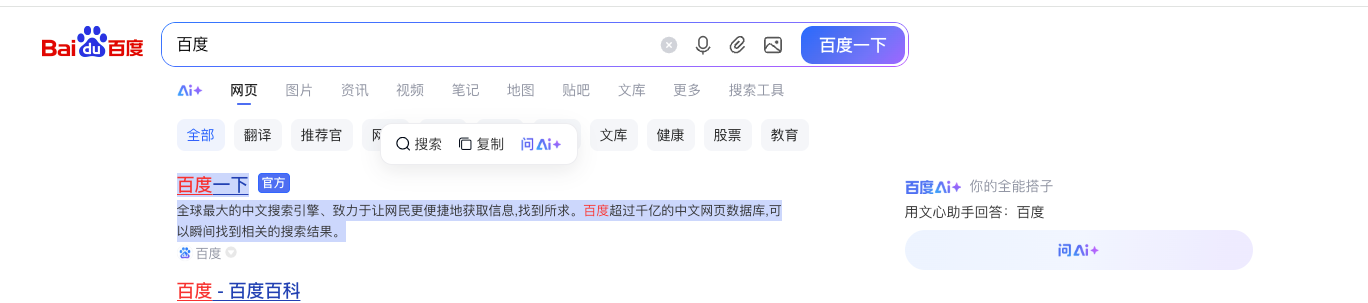
肉眼可见的是以下内容
百度一下

官方
全球最大的中文搜索引擎、致力于让网民更便捷地获取信息,找到所求。百度超过千亿的中文网页数据库,可以瞬间找到相关的搜索结果。
实际上的内容
<meta charset='utf-8'><div class="title-wrapper_6E6PV" style="-webkit-font-smoothing: antialiased; display: flex; -webkit-box-align: center; align-items: center; color: rgb(51, 51, 51); font-family: Arial, sans-serif; font-size: 13px; font-style: normal; font-variant-ligatures: normal; font-variant-caps: normal; font-weight: 400; letter-spacing: normal; orphans: 2; text-align: start; text-indent: 0px; text-transform: none; widows: 2; word-spacing: 0px; -webkit-text-stroke-width: 0px; white-space: normal; background-color: rgb(255, 255, 255); text-decoration-thickness: initial; text-decoration-style: initial; text-decoration-color: initial;"><div class=" title-box_4YBsj" style="-webkit-font-smoothing: antialiased; display: flex; max-width: 100%;"><h3 class="t _sc-title_10ku5_63 title_2X7ZC struct-title_2gZl4" style="margin: 0px 0px 4px; padding: 0px; list-style: none; font: 500 18px / 24px "PingFang SC", Arial, sans-serif; -webkit-font-smoothing: antialiased; -webkit-box-flex: 1; flex: 1 1 auto; min-width: 0px;"><a class="sc-link _link_1iyz5_2 -v-color-primary block" href="http://www.baidu.com/link?url=BDThAADsXFc5r7OJk-Bq1znGlaXraoRF-WGzmsXLrHWkL5Zx4xyBjmYtVFySMShu" target="_blank" data-module="title" style="color: rgb(36, 64, 179); text-decoration: 1px; cursor: pointer; display: inline-block; margin-bottom: 6px; max-width: 100%; -webkit-font-smoothing: antialiased; text-underline-offset: 3px;"><div style="-webkit-font-smoothing: antialiased;"><div class="_no-spacing_10ku5_31" data-module="" style="display: flex; -webkit-font-smoothing: antialiased;"><p class="_paragraph_10ku5_2 cu-line-clamp-default cu-line-clamp-1 md sc-paragraph" style="margin: -2px 0px -3px; padding: 0px; list-style: none; display: block; overflow: hidden; text-overflow: ellipsis; white-space: nowrap; -webkit-line-clamp: 1; font: 500 18px / 24px Arial, sans-serif; -webkit-font-smoothing: antialiased; text-decoration: underline 1px; text-underline-offset: 3px;"><span style="-webkit-font-smoothing: antialiased;"><span style="-webkit-font-smoothing: antialiased;"><span class="tts-b-hl" data-click="{"F":"778317EA","F1":"9D73F1E4","F2":"4CA6DD6A","F3":"54E5243F","T":1763885787,"y":"AFFAFF2B","rsv_gwlink":"1","clk_info":"{\"action\":\"title\",\"url\":\"https%3A%2F%2Fm.baidu.com%2F%3Ffrom%3D1000953f\",\"content\":\"\\u0002百度\\u0003一\\u0001下\\u0001\",\"is_ow\":\"1_1\",\"temp_type\":\"text\"}"}" style="-webkit-font-smoothing: antialiased;"><em style="font-style: normal; color: rgb(247, 49, 49); text-decoration: underline 1px; -webkit-font-smoothing: antialiased; text-underline-offset: 3px;">百度</em>一下</span></span></span></p></div></div></a></h3><span class="suffix-icon_3Ox2w" data-click="{"clk_info":"{\"action\":\"ow_tag\",\"url\":\"https%3A%2F%2Fm.baidu.com%2F%3Ffrom%3D1000953f\",\"is_ow\":\"1_1\"}"}" sub-show="true" sub-show-log="{"area":"ow_tag","ext":{"url":"https://m.baidu.com/?from=1000953f","is_ow":"1_1"}}" style="-webkit-font-smoothing: antialiased; margin-bottom: 3px; margin-left: 9px;"><a href="https://aiqicha.baidu.com/feedback/official?from=baidu&type=gw" target="_blank" style="color: rgb(36, 64, 179); text-decoration: none; -webkit-font-smoothing: antialiased;"><span data-module="" class="sc-tag cos-font-medium-important
tag_6iNm4
cos-space-mr-xxs
top-gap-3_11grE
www-tag-fill-blue_3n0y3
www-sc-tag-font-size_638Dx
" style="display: inline-block; align-items: center; justify-content: center; line-height: 18px; padding: 0px 3px; font-size: 12px; border-radius: 4px; color: rgb(255, 255, 255); background-color: rgb(78, 110, 242); font-family: "PingFang SC", Arial, sans-serif; -webkit-text-stroke: 0px rgb(255, 255, 255); font-weight: 500 !important; margin-right: 6px; margin-top: -0.03rem; border: 1px solid rgb(51, 102, 255); vertical-align: middle; word-break: keep-all; -webkit-font-smoothing: antialiased;">官方</span></a></span></div></div><div class="cos-row " data-sanssr-cmpt="card/www-summary" style="display: flex; -webkit-font-smoothing: antialiased; color: rgb(51, 51, 51); font-family: Arial, sans-serif; font-size: 13px; font-style: normal; font-variant-ligatures: normal; font-variant-caps: normal; font-weight: 400; letter-spacing: normal; orphans: 2; text-align: start; text-indent: 0px; text-transform: none; widows: 2; word-spacing: 0px; -webkit-text-stroke-width: 0px; white-space: normal; background-color: rgb(255, 255, 255); text-decoration-thickness: initial; text-decoration-style: initial; text-decoration-color: initial; justify-content: space-between; align-items: flex-end; --bottom-gap: .03rem;"><div class="cos-col" style="flex: 0 0 auto; box-sizing: border-box; -webkit-font-smoothing: antialiased; width: 608px;"><div url="" class="content-gap_3jlQr" data-module="abstract" style="margin-bottom: 3px; -webkit-font-smoothing: antialiased;"><div class="
c-color
summary-gap_3Jb4I" role="text" style="margin-top: -0.045rem; -webkit-font-smoothing: antialiased;"><div class="cu-line-clamp-2" style="display: -webkit-box; -webkit-box-orient: vertical; overflow: hidden; text-overflow: ellipsis; white-space: normal; -webkit-line-clamp: 2; -webkit-font-smoothing: antialiased;"><span class="
summary-text_560AW
" style="-webkit-font-smoothing: antialiased; color: rgb(51, 51, 51);">全球最大的中文搜索引擎、致力于让网民更便捷地获取信息,找到所求。<em style="font-style: normal; color: rgb(247, 49, 49); -webkit-font-smoothing: antialiased;">百度</em>超过千亿的中文网页数据库,可以瞬间找到相关的搜索结果。</span></div></div></div></div></div>使用vscode paste
快捷键 shift + command + p,save as , insert html

AI Vibe Coding 一个页面,读取剪切板
提示词如下:
请写一个html页面,可以读取剪切板,并且知道剪切板当前的内容类型是什么,可以读取图片,读取任何。📋 剪贴板内容读取器
💡 使用说明
- 在任意应用程序中复制内容(文本、图片、文件等)
- 点击下方按钮或按 Ctrl+V / Cmd+V 读取剪贴板
- 支持多种内容类型自动检测和显示
剪贴板内容
等待读取剪贴板内容...
如果你需要将一个图片写入剪切板,并且让其他人看到,可以使用以下方式
r const htmlContent = '<meta charset="utf-8"><img src="http://localhost:9521/resources/1.png">';

            // Fetch the image to get the blob
            const response = await fetch('http://localhost:9521/resources/1.png');
            const imageBlob = await response.blob();

            // Create ClipboardItem with only text/html and image/png formats
            const clipboardItem = new ClipboardItem({
                'text/html': new Blob([htmlContent], { type: 'text/html' }),
                'image/png': imageBlob
            });

            // Write to clipboard
            await navigator.clipboard.write([clipboardItem]);